macOS AU + VST3, 64-bit. No AAX. Not compatible with Pro Tools.
License key required. Delivered by email after purchase.
The Circuit Before the Damage
Before CRUSH, FOLD, or RING touches the signal, IX is already a complete high-gain drive and fuzz circuit built to stay playable under extreme settings.
Drive
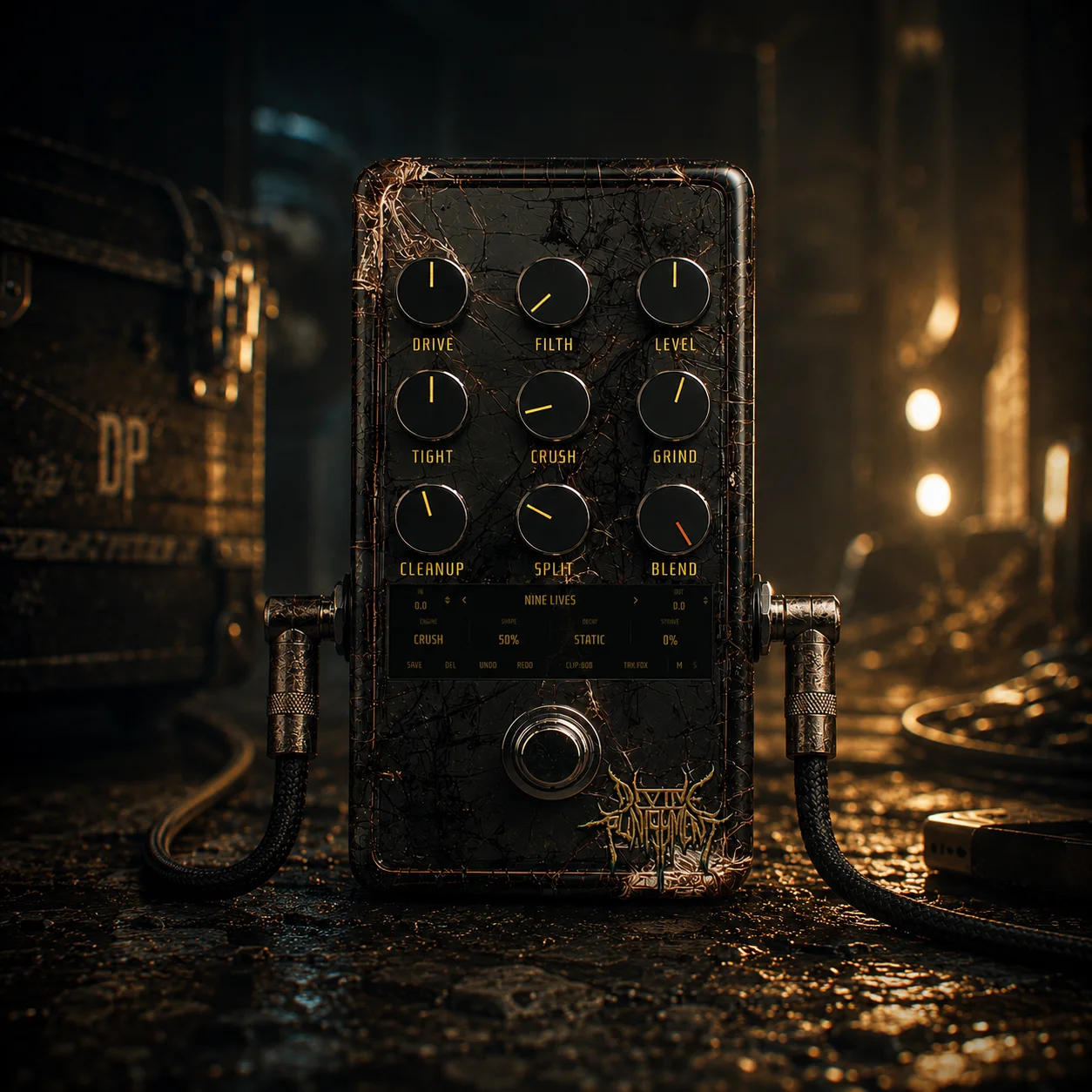
One continuous sweep with up to 300x gain. It begins with responsive edge-of-breakup, crosses into saturated high gain, and becomes deliberately vicious at the top.
Filth
A separate four-stage fuzz stacked into the circuit. Low settings add hair. Higher settings collapse into sputtering, self-gating, velcro-ripping filth.
Tight
A pre-distortion low-cut that decides what reaches the gain circuit. Keep the weight, remove the mud, or sharpen low tunings into something surgical.
Cleanup
A two-stage gate built for high gain. Silence the spaces between notes, then push it further when you want the tails cut short.
Three Engines of Ruin
IX is not one distortion with one texture. It is a continuous drive circuit with three different ways to destroy the signal after the drive stage, while SPLIT keeps everything below the split point solid.
Crush
Digital destruction. From gritty decay to total disintegration. Use it when you want everything above SPLIT to crumble, splinter, and collapse.
Fold
Wavefolded violence. Notes bend back into themselves and generate snarling, brassy harmonics that feel mechanical and unstable.
Ring
Metallic wrongness. Fixed for alien overtones, or tracked to your playing so the ring mod behaves more like an instrument than a sound effect.
The Low End Survives. The Rest Is Negotiable.
SPLIT keeps the foundation intact while IX destroys everything above it.
Playable Destruction
IX does not just add gain. It decides what gets protected, what gets destroyed, and when that destruction should happen.
Chugsense
Palm mutes stay tight because IX listens for them. CHUGSENSE automatically backs the destruction off on chugs so the attack stays usable even when the rest of the tone is in pieces.
Split
Keep the low end safe. Everything below the split point remains clean and solid while the upper range takes the full destruction treatment.
Decay
Choose how the damage follows the note. PG protects the attack and lets the sustain take the hit. ROT starts clearer and lets the note decay into ruin.
Starve
A dying-battery circuit that sags harder when you hit it harder. Quiet passages stay healthier. Harder playing gets choked, compressed, and uglier.
Right-Click Removal
Every major stage except BLEND can be removed completely with a right-click. This is not the same as setting a control to 0. It pulls that stage out of the circuit entirely.
Unclip It
Right-click CLIP to remove the clipping stage while keeping the raw drive gain. The result is an unclipped surge into the fuzz and destruction circuit that cannot be reached with a normal clipping setting.
Track It
In RING mode, TRK follows one note at a time and holds the metallic voice at a defined interval above or below what you play.
Watch It Heat Up
The enclosure reacts to the circuit and your performance. Cracks spread, the materials glow, and the hidden mark emerges as IX is pushed harder.
Pull the Circuit Apart
IX does not merely turn controls down. Fourteen major stages can be removed from the signal path completely. Try it here.
14 / 14 STAGES IN CIRCUIT
Blend - Always In Path
Setting a control to 0 leaves its stage active at the minimum setting. Removing it cuts the stage out of the circuit entirely.
The demonstration above is visual. Inside IX, bypass states are saved with presets and can be automated.
DRIVE is one continuous circuit, not a collection of separate gain modes. The upper range is designed to become more aggressive, not merely louder.
FILTH is a separate four-stage fuzz. It enters gradually, then stacks quickly past the center until the note begins to sputter and gate itself.
TIGHT filters the signal before distortion. Removing TIGHT with a right-click gives you full bandwidth into the drive, which is different from setting TIGHT to 0.
CLEANUP is a two-stage gate. Lower settings remove background noise. Higher settings deliberately shorten note tails for stop-on-a-dime rhythm playing.
GRIND is a tilt control centered around 800 Hz. Move left for a darker, thicker result. Move right for more bite and separation.
CLIP switches between two voices. 808 is smooth and symmetrical. MOD is asymmetric, rawer, and more aggressive. Right-click CLIP to remove clipping while keeping the drive gain.
IX can process in mono or stereo. Mono gives you the traditional pedal experience. Stereo preserves the image of wider sources.
The enclosure is an honest meter. As the circuit and performance become more violent, the cracks spread, the materials heat up, and the pedal begins to glow.
Build the Circuit. Then Break It.
Start with the drive. Add the destruction you want. Remove every stage you do not.
IX is one continuous drive circuit plus a destruction section that can crush, fold, or ring-modulate the upper part of the signal while keeping the lows intact. It also reacts to how you play, can change when destruction arrives, and lets you remove major stages from the circuit completely.
CRUSH handles digital disintegration. FOLD wavefolds the signal into brassy harmonic aggression. RING adds metallic overtones and can either stay fixed or track what you play.
64-bit VST3 for Windows and Audio Unit (AU) plus VST3 for macOS. Compatible with DAWs that support these formats. AAX is not included, so IX is not compatible with Pro Tools.
No. Windows and macOS are separate purchases. Each platform has its own checkout.
After purchase, you'll receive a license key by email. Each license is intended for one user and includes activation for up to 2 machines. If you change computers or need an activation reset, contact support and we'll help.
Every major stage except BLEND can be removed from the signal path completely with a right-click. That is different from setting a knob to 0, which leaves the stage active at its minimum setting. Right-clicking removes the stage itself.
All digital purchases are final due to the nature of downloadable software. If you have an installation, compatibility, or activation issue, contact support and we'll help you get it working.
Not currently. These plugins are launching with introductory pricing for a limited time, with regular pricing planned after the launch period.
IX's main cost comes from its 4x oversampled drive and destruction core. Unused sections do not keep running in the background. The destruction engine, fuzz cascade, gates, and pitch tracker all skip when idle, and right-click-removed stages cost no CPU at all. There are no sample libraries or convolution, so RAM use is negligible.
CHUGSENSE is IX's automatic palm-mute detection. When it hears a chug, it backs the destruction off so the palm mute stays tight and controlled instead of collapsing into mush.
No. IX is a distortion and destruction pedal, not an amp or cab simulator. Use it with your own amp sim and cab or IR chain, or blend it against your dry signal when you want to keep more definition.
Use IX like a pedal. Place it before your amp sim and cab or IR chain when you want the amp to react to the distortion, or after a preamp stage when you want more direct control over the destruction. Use BLEND and SPLIT to keep definition when settings get extreme.
About
Divine Punishment's debut album "Infinity" is six tracks of meticulously crafted extremity. Every note, every layer, every sound, built from scratch with no outside input and no creative compromises.
Infinity is the debut album. Six tracks that move between crushing, calculated aggression and moments of genuine beauty, tied together by a single idea: "Existence itself is the architect of Divine Punishment."
Lore
Divine Punishment is the idea that consequences don't announce themselves. They don't arrive with preface or warning. They're happening right now whether you like it or not.
Infinity was built around that idea. Creation and destruction aren't opposites, they're the same motion observed at different points in the cycle.
Infinity eventually ends. But sometimes it's just the beginning.
Contact
macOS version
You are purchasing the macOS build: Audio Unit (AU) plus VST3, 64-bit. This is NOT compatible with Pro Tools. There is no AAX version. Confirm your DAW supports AU or VST3 before continuing.